Skip to content

MoPlayer Classic · v2.5.1

Your channels.
Clear on every TV.

A light, remote-first player for your own Xtream or M3U source. Live TV with a guide, Movies and Series — at the same comfortable size on a 720p box, a 4K TV or a phone in landscape.

On a TV? Type in Downloader:2418397ormoalfarras.de/mp
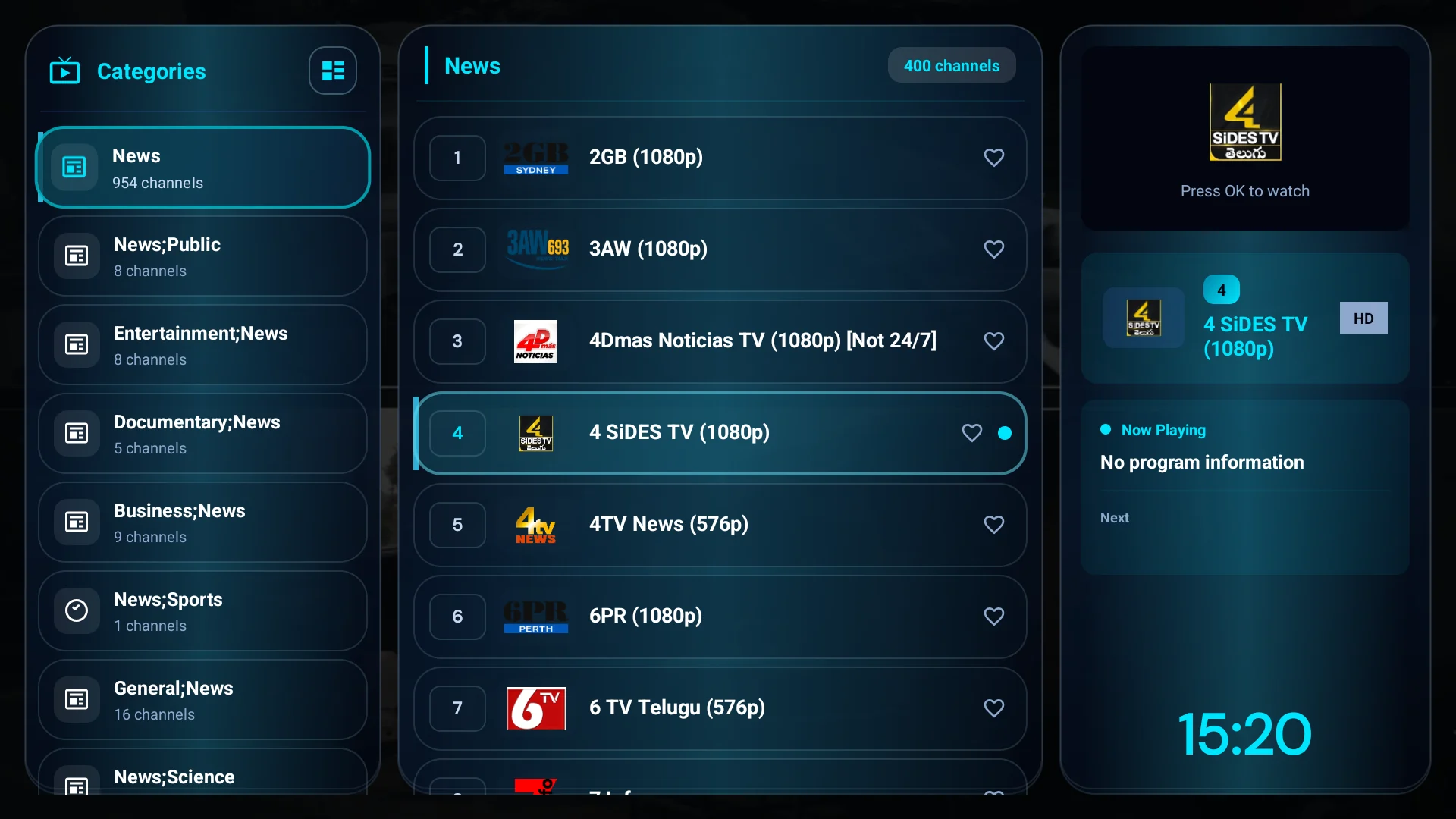
MoPlayer Classic 2.5.0 Live TV: categories, a numbered news channel list and the preview panel on an Android TV
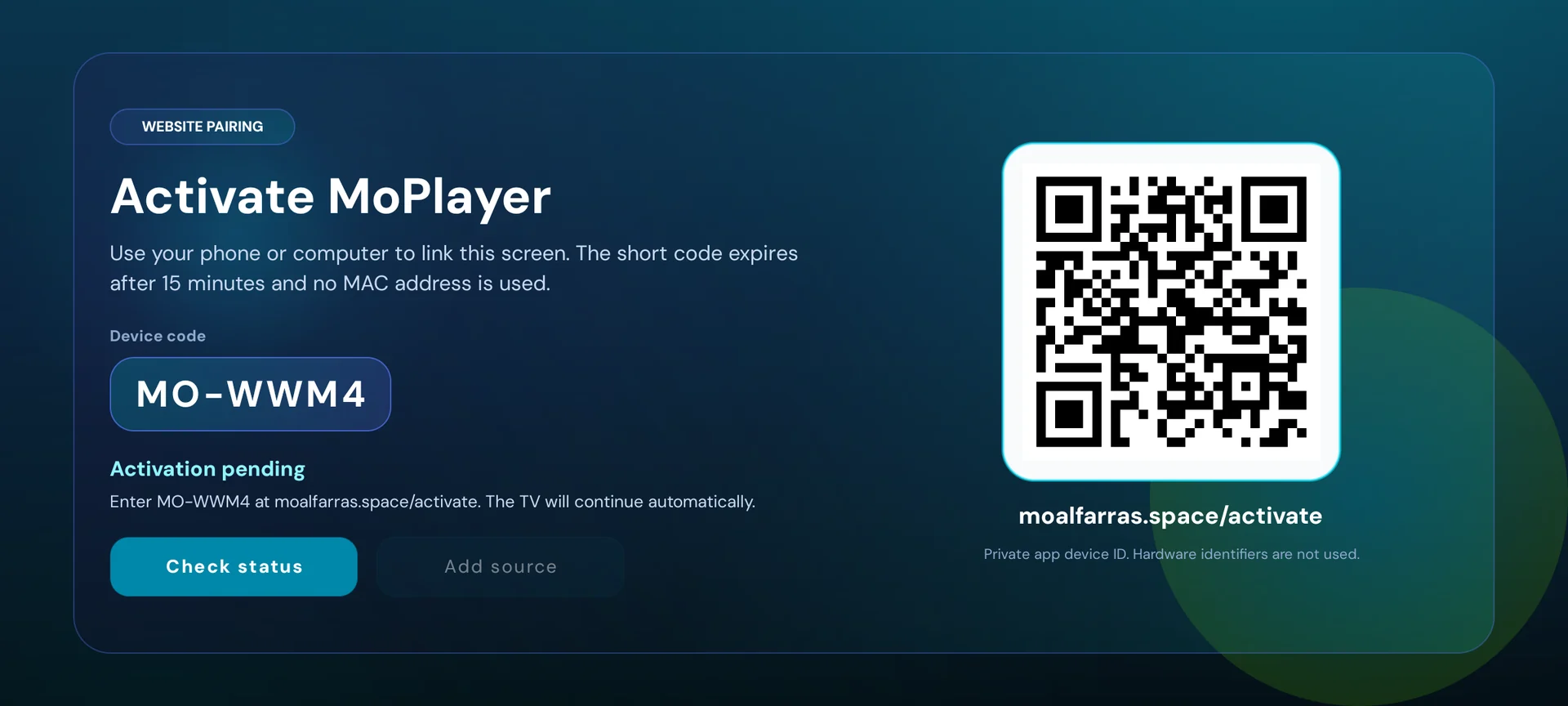
MoPlayer Classic 2.5.0 activation screen with a QR code, a short device code and the moalfarras.space/activate address

What's in the box

  • Android TV · Google TV · Fire TV
  • Phones and tablets in landscape
  • Xtream Codes · M3U · XMLTV
  • English · العربية

Inside 2.5.0

Built around the remote, tested on real lines.

MoPlayer Classic 2.5.0 Live TV: categories, a numbered news channel list and the preview panel on an Android TV

Live TV

A channel browser that stays open while you choose.

Categories, numbered channels and a 16:9 preview sit side by side. Move with the D-pad, mark favorites, press OK to watch.
  • Every category shows how many channels it holds
  • The preview never opens a second stream on one-connection lines
  • Favorites with one press, correct Arabic channel names
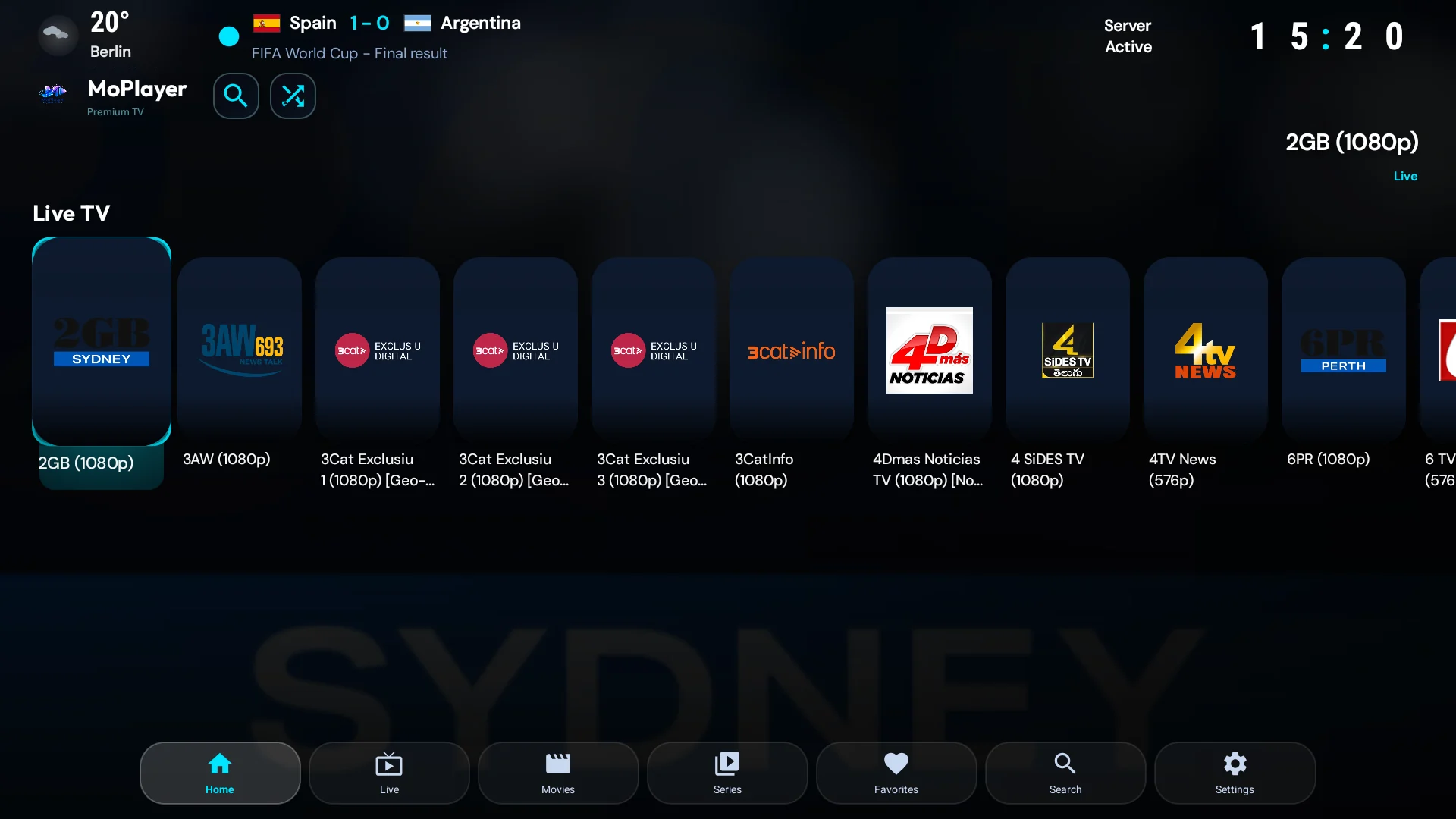
MoPlayer Classic 2.5.0 Home screen with the Live TV row focused and the bottom navigation bar

Home

Home starts on the first title, with a Live TV row.

Jump straight into live channels from Home. Real source names, ratings out of 10 and clean descriptions — and no more flicker when the account is re-checked.

Interface size

The same interface size on every TV.

TVs and boxes report different screen densities, which used to make the interface huge on one and tiny on another. 2.5.0 draws one consistent layout everywhere, and you can still choose Compact, Standard or Large.

Arabic & English

Fully translated, with a real right-to-left layout.

Pick the device language, English or Arabic in Settings. In Arabic the whole interface mirrors, and the app now ships its real DM Sans and Outfit fonts.
MoPlayer Classic 2.5.0 activation screen with a QR code, a short device code and the moalfarras.space/activate address

QR activation

Add your source from your phone, not the remote.

The TV shows a QR code and a short device code. Scan it, enter your Xtream or M3U details at moalfarras.de/activate, and the TV continues on its own.
  • The code expires after 15 minutes; no MAC address is used
  • Your source reaches the TV once and is not kept on the website
  • Prefer typing? Add Xtream or M3U directly on the TV

Made for the lines people actually have

A guide for M3U too

The XMLTV link from activation, or the playlist’s own url-tvg link, now fills the programme guide for M3U sources.

Android 7 boxes at 720p

Checked on Android TV 7.0 at 720p as well as 1080p TVs. One universal APK covers 64-bit and 32-bit ARM boxes.

Clear answers on one-connection lines

When a channel won’t open, MoPlayer says why within seconds instead of retrying forever.

Also on phones and tablets

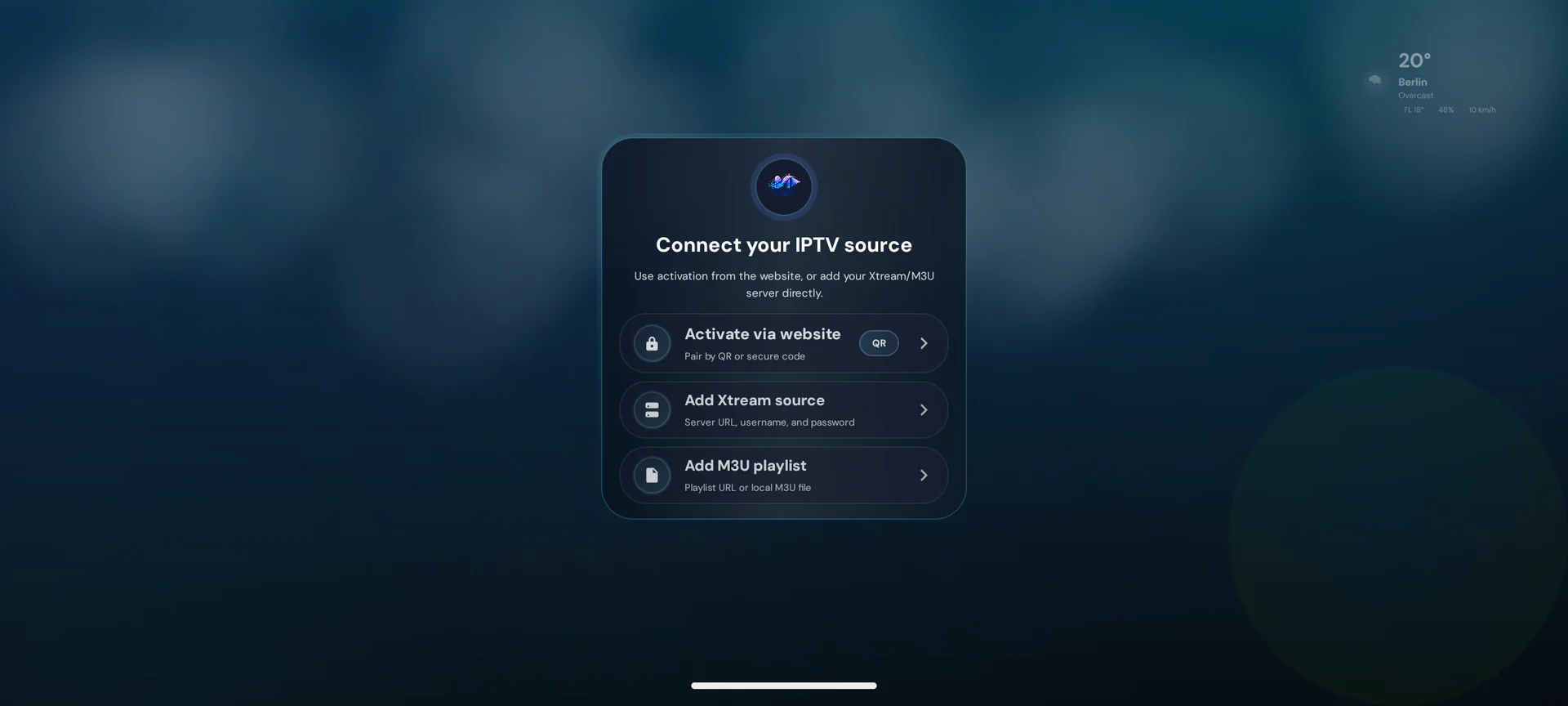
Hold your phone sideways and MoPlayer Classic shrinks the TV layout to fit, full screen.

MoPlayer Classic 2.5.0 on a phone in landscape: choose website activation, an Xtream source or an M3U playlist

Android TV · Google TV · Fire TV

Install MoPlayer Classic on your TV in a minute

  1. Install Downloader

    Open the app store on your Android TV, Google TV or Fire TV, search for “Downloader” by AFTVnews and install it. It is free.

  2. Type the code

    Type the code below in Downloader and press Go to open the official page, then choose Download APK for MoPlayer Classic. To start the download directly, type the short link instead. If Android asks, allow Downloader to install unknown apps.

  3. Install and activate

    Open the app, scan the QR code with your phone and add your own Xtream or M3U source at moalfarras.de/activate.

Downloader code

2418397

Or type this short link

moalfarras.de/mp

Always the latest version — the link never changes.

Both apps on one TV page:moalfarras.de/tv

Release

MoPlayer Classic 2.5.1

Every number on this page comes from the published release, so it always matches the file you download.

Version

2.5.1 (26)

APK size

50.8 MB

Requires

Android 7.0 or newer

Devices

TV, box, phone and tablet (landscape)

Sources

Xtream Codes, M3U, XMLTV guide

Released

4 October 2026

Official downloads

59

SHA-256

210aba349a743437…66c909f3ea1c

Signed APK, served from GitHub Releases

Classic or Pro

Two separate apps. Pick the one that suits your TV.

Both are free, both are players only, and they install side by side. Each has its own APK, activation and updates.

MoPlayer ClassicThis page

Best for
Older and low-power boxes, and a familiar classic layout
Latest version
2.5.1
Minimum
Android 7.0
APK size
50.8 MB
Interface
Blue glass with a clear cyan focus
Library
Live TV with EPG, Movies, Series, Favorites, Search
Player
Media3 with VLC as fallback
Both include
QR activation, Interface size, Arabic and English
Phones
Phones and tablets in landscape
Classic page

MoPlayer Pro

Best for
Newer TVs and boxes, and a richer player
Latest version
2.7.5
Minimum
Android 6.0
APK size
53.6 MB
Interface
Rebuilt in Jetpack Compose, warm amber glass
Library
Indexed library with fast search, continue watching and next-episode playback
Player
Media3 with LibVLC fallback, faster channel zapping
Both include
QR activation, Interface size, Arabic and English
Phones
Adaptive phone and tablet layouts
Pro page

Questions

Good to know before you install

Something not working?

  • The app says the line is in use: close MoPlayer or any other player on your other devices — one-connection lines allow one stream at a time.
  • Android blocks the install: allow your browser or Downloader to install unknown apps, then open the APK again.
  • Activation code expired: go back and open activation again; the TV fetches a fresh code.
Contact support
Does MoPlayer include channels or playlists?
No. MoPlayer Classic is a player only. It includes no channels, playlists or subscriptions. You add your own Xtream Codes account or M3U playlist that you are legally allowed to use.
Which devices does MoPlayer Classic run on?
Android TV, Google TV, Fire TV and Android TV boxes with Android 7.0 or newer, plus Android phones and tablets in landscape. One universal APK covers 64-bit and 32-bit ARM devices.
How do I add my source?
Open the app and choose website activation. Scan the QR code on the TV with your phone and enter your Xtream or M3U details at moalfarras.de/activate; the TV continues on its own. You can also type the details directly on the TV.
Does the TV guide (EPG) work with M3U playlists?
Yes. Since 2.5.0 the XMLTV link you add during activation, or the url-tvg link inside the playlist, fills the guide for M3U sources. Xtream accounts use the provider's own guide.
Is my source stored on the website?
No. A source sent through QR activation is encrypted, delivered to your TV once and then removed from the website. It is saved only on your device.
How do I update?
Settings › App update checks for the latest version and verifies the file size and SHA-256 before installing. You can also download the newest APK from this page or moalfarras.de/mp at any time; it installs over the old version and keeps your source.
Is MoPlayer on Google Play?
No. MoPlayer Classic is distributed as a signed APK from this website and its GitHub Releases only.

MoPlayer is a media player only. It does not sell or include channels, playlists, subscriptions or copyrighted media. You add a source you own or are legally allowed to use.

Read the app disclaimer